Scaling PikoCI
PikoCI is designed to grow with your needs. You can start with a single binary and zero external dependencies, then scale to distributed workers and production-grade databases without changing your pipeline config.
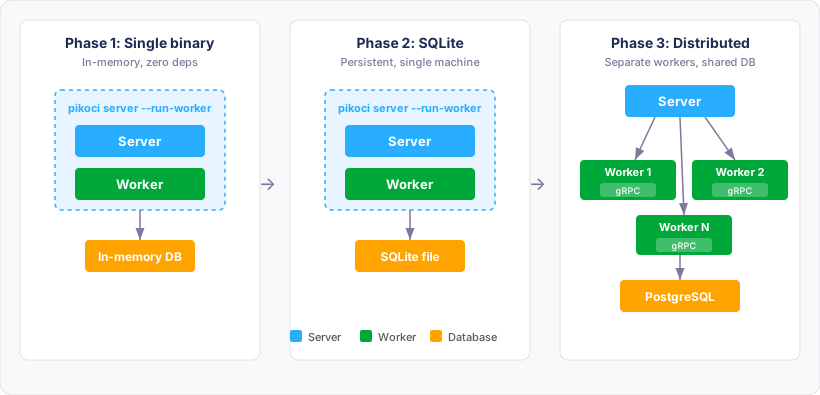
Phase 1: In-memory, single machine
The fastest way to get started. Everything runs in a single process. No files, no external services, no configuration.
pikoci server \
  --db-system mem \
  --run-worker \
  --jwt-secret my-secret \
  --pipeline-name my-pipeline \
  --pipeline-config pipeline.hcl
What this gives you: - Server + worker in one process - Pipeline loaded at startup, ready immediately - Zero external dependencies
The trade-off: - All data is lost on restart - Only one worker
Good for: local development, trying things out, CI for small personal projects.
Phase 2: SQLite, single machine
Add persistence without any new infrastructure. One flag change.
pikoci server \
  --db-system sqlite \
  --db-name pikoci.db \
  --run-worker \
  --jwt-secret my-secret \
  --pipeline-name my-pipeline \
  --pipeline-config pipeline.hcl
What this gives you: - Build history survives restarts - Resource versions and cursors persist - Still zero external dependencies
Note: From Phase 2 onward, pipelines persist in the database. You can
manage them via the web UI or CLI (pikoci client pipelines create ...)
instead of passing --pipeline-name / --pipeline-config on every start.
The flags still work; they create or update the pipeline at startup.
Migrating from in-memory:
If you started with in-memory and want to keep your data, export it first:
# while the server is still running
pikoci client export --url http://localhost:8080 --output pikoci.db

# stop the server, restart with SQLite pointing at the exported file
pikoci server --db-system sqlite --db-name pikoci.db ...
Good for: teams that want history, projects that need to survive restarts.
Phase 3: Distributed workers
Add more workers without changing the server. Workers connect via gRPC streaming and only need network access to the server. No external queue service required.
Step 1: Restart the server without a built-in worker:
pikoci server \
  --db-system sqlite \
  --db-name pikoci.db \
  --run-worker=false \
  --jwt-secret my-secret
Step 2: Start workers on any machine:
# generate a worker token (or copy it from the server startup logs)
pikoci worker-token --jwt-secret my-secret

# start worker 1 (same machine or different)
pikoci worker \
  --pikoci-url http://your-server:8080 \
  --worker-token <token>

# start worker 2
pikoci worker \
  --pikoci-url http://your-server:8080 \
  --worker-token <token>
Add as many workers as you need. Workers connect to the server via gRPC streaming and receive jobs as they become available. Workers can be on different machines, in different networks, or behind NAT. They only need outbound access to the server port.
What this gives you: - Multiple workers running jobs in parallel - Workers can be on any machine - Workers can come and go without affecting the server - No external queue service to manage
Good for: teams with multiple projects, jobs that need specific hardware, isolating workloads.
Phase 4: Production with PostgreSQL
Replace SQLite with PostgreSQL for better performance, concurrent access, and the ability to run multiple server instances.
pikoci server \
  --db-system postgresql \
  --db-host db.example.com \
  --db-port 5432 \
  --db-user pikoci \
  --db-password secret \
  --db-name pikoci \
  --run-worker=false \
  --jwt-secret my-secret
Migrating from SQLite to PostgreSQL:
pgloader handles SQLite to PostgreSQL migration in
one command. Install it first (apt install pgloader, brew install pgloader,
or use the Docker image), then:
PikoCI runs database migrations automatically on startup, so after pgloader
copies the data, just restart the server with --db-system postgresql and
migrations will bring the schema up to date if needed.
Multiple server instances:
With PostgreSQL you can run multiple server instances behind a load balancer.
The DB-backed scheduler uses SELECT ... FOR UPDATE SKIP LOCKED to ensure
each resource check is processed by only one instance.
# instance 1
pikoci server --db-system postgresql --db-host db.example.com --db-name pikoci \
  --run-worker=false --jwt-secret my-secret ...

# instance 2 (same config, different machine)
pikoci server --db-system postgresql --db-host db.example.com --db-name pikoci \
  --run-worker=false --jwt-secret my-secret ...
What this gives you: - High availability: server instances can restart without downtime - Better performance for large builds and many pipelines - Multiple server instances behind a load balancer
Good for: production deployments, teams that need HA, large-scale CI.
Summary
| Phase | Database | Workers | Use case |
|---|---|---|---|
| 1 | Memory | Built-in | Development, trying things out |
| 2 | SQLite | Built-in | Small teams, persistence needed |
| 3 | SQLite | Distributed (gRPC) | Multiple workers, any machine |
| 4 | PostgreSQL | Distributed (gRPC) | Production, high availability |
The pipeline config never changes between phases. Add infrastructure when you need it, not before.
Other supported backends
Databases: SQLite, MySQL, MariaDB, PostgreSQL
See Database Backends for full configuration reference.