Audit Log
The audit log records who did what within a team. Every significant action: creating a pipeline, cancelling a build, changing a member's role, is captured as an append-only entry with the actor, action, target, and timestamp.
Accessing the Audit Log
UI
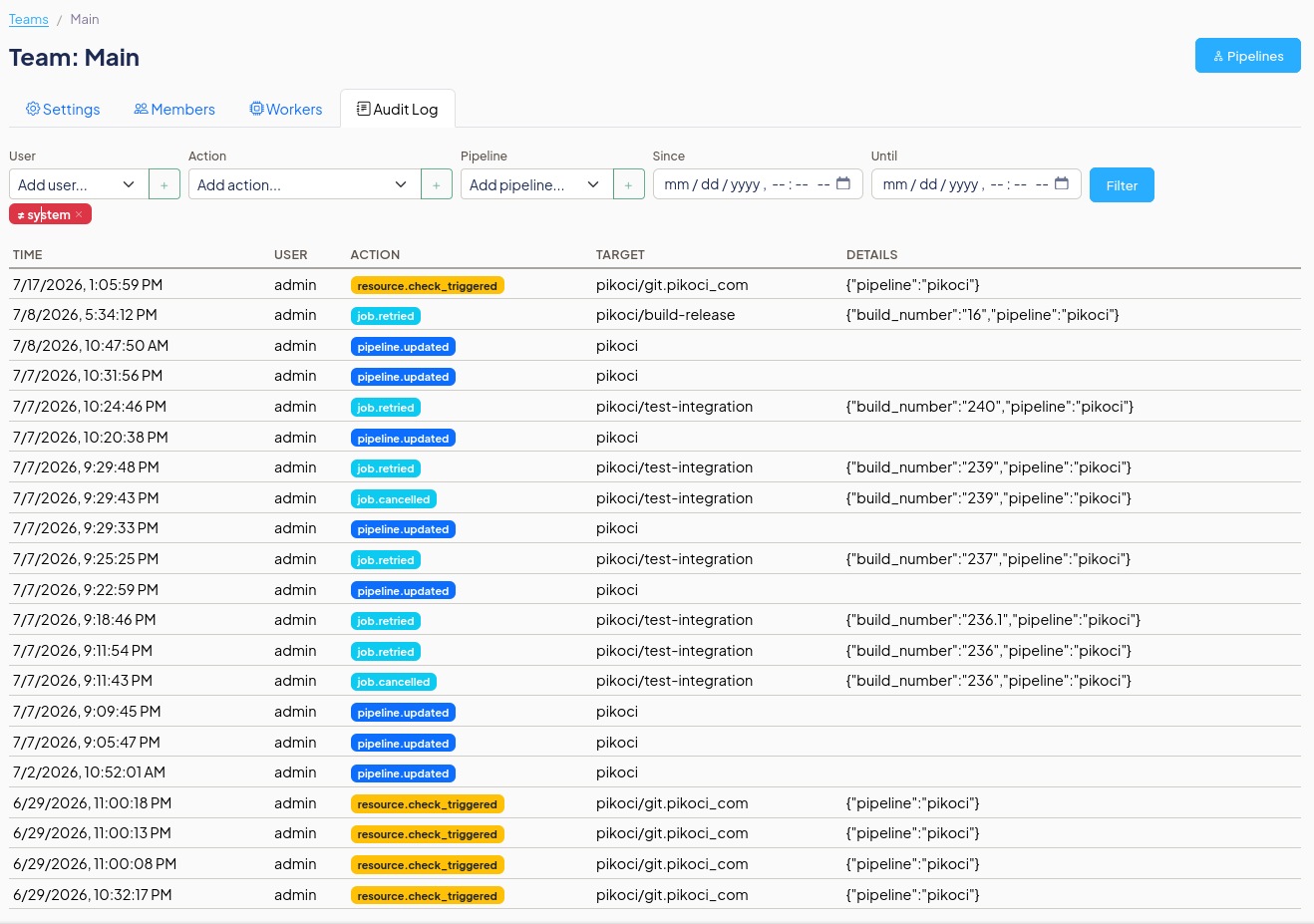
Navigate to a team page and click the Audit Log tab. The URL is shareable:
CLI
API
curl -H "Authorization: Bearer $TOKEN" \
     -H "Content-Type: application/json" \
     https://ci.example.com/teams/main/audit
Tracked Events
| Action | Target Type | When |
|---|---|---|
pipeline.created |
pipeline | Pipeline is created |
pipeline.updated |
pipeline | Pipeline config is updated (includes renamed_from if renamed) |
pipeline.deleted |
pipeline | Pipeline is deleted |
pipeline.paused |
pipeline | Pipeline is paused |
pipeline.unpaused |
pipeline | Pipeline is unpaused |
job.triggered |
job | Job build is manually triggered |
job.cancelled |
job | Running or pending build is cancelled |
job.retried |
job | Completed build is retried |
job.paused |
job | Job is paused |
job.unpaused |
job | Job is unpaused |
resource.pinned |
resource | Resource is pinned to a version |
resource.unpinned |
resource | Resource pin is removed |
resource.check_triggered |
resource | Resource check is manually triggered |
member.added |
team_member | Member is added to the team (includes role) |
member.removed |
team_member | Member is removed from the team |
member.role_changed |
team_member | Member's role is changed (includes old_role and new_role) |
build.approved |
build | A user approves a build |
build.rejected |
build | A user rejects a build |
build.marked_warning |
build | A build is marked as warning (allow_failure) |
Actions performed by the system (e.g., scheduler-triggered checks) use the actor name system.
Filtering
All filters support multiple values (OR logic within a filter, AND across filters). Each value can be individually toggled between include and exclude.
Query Parameters
| Parameter | Description |
|---|---|
user |
Show entries by this actor (repeatable) |
exclude_user |
Hide entries by this actor (repeatable) |
action |
Show entries with this action (repeatable) |
exclude_action |
Hide entries with this action (repeatable) |
pipeline |
Show entries whose target starts with this pipeline canonical (repeatable) |
since |
Show entries after this time (RFC 3339) |
until |
Show entries before this time (RFC 3339) |
before |
Cursor: entries with ID less than this (for pagination) |
after |
Cursor: entries with ID greater than this |
limit |
Max entries to return (default 50) |
CLI Examples
# All audit entries for the main team
pikoci client audit list --team-canonical main

# Only pipeline events
pikoci client audit list --action pipeline.created --action pipeline.deleted

# Exclude system actor
pikoci client audit list --exclude-user system

# Events by two specific users
pikoci client audit list --user alice --user bob

# Events for a specific pipeline since a date
pikoci client audit list --pipeline deploy --since 2026-01-01T00:00:00Z
UI Filters
In the Audit Log tab, each filter (User, Action, Pipeline) is a multi-select dropdown:
- Select a value from the dropdown and click + to add it
- The value appears as a blue chip (include): entries matching this value are shown
- Click the chip to toggle it to a red chip (exclude): entries matching this value are hidden
- Click × on a chip to remove it
- Click Filter to apply
Example: to see all actions except those by system, add system to the User filter, click the chip to turn it red (exclude), then click Filter.
Permissions
Any team member with Read role or above can read the audit log. API tokens with Read access can also read it.
The audit log is read-only. There is no API to modify or delete entries.
Data Retention
Audit log entries are kept indefinitely. They persist even after the actor is removed from the team or the target pipeline is deleted, since entries store names as plain text rather than foreign key references.
The only automatic cleanup is when an entire team is deleted: all its audit log entries are cascade-deleted with it.