Approval Gates
Approval gates let you require human authorization before a job runs. The pipeline builds and tests automatically, but deployment waits for someone to approve.
Overview
- Jobs with an
approveblock create builds in Waiting for Approval status (purple) - Builds don't consume worker resources while waiting
- Maintain+ role is required to approve or reject
- A single rejection immediately fails the build
- Retries of approved-then-failed builds skip the gate
HCL Syntax
Add an approve block inside any job:
job "deploy" {
  get "git" "app" { passed = ["test"] }

  approve "deploy to production" {
    approvals = 2

    notify "discord" "deploy-alerts" {
      message = "⏳ Build #$BUILD_NUMBER needs approval $BUILD_URL"
    }
  }

  task "deploy" {
    run "exec" { path = "./deploy.sh" }
  }
}
Parameters
| Parameter | Required | Default | Description |
|---|---|---|---|
| label (first argument) | yes | - | Display label for the approval gate |
approvals |
no | 1 | Number of approvals required before the build starts |
Notifications
The approve block can contain a notify sub-block that fires when a build enters Waiting for Approval. The notification references a pipeline-level notification by type and name.
approve "deploy to production" {
  notify "discord" "deploy-alerts" {
    message = "⏳ Build #$BUILD_NUMBER needs approval $BUILD_URL"
  }
}
Available variables for message interpolation:
| Variable | Description |
|---|---|
$BUILD_NUMBER |
The build number |
$BUILD_PIPELINE_NAME |
The pipeline canonical name |
$BUILD_JOB_NAME |
The job name |
$BUILD_TEAM_NAME |
The team canonical name |
$BUILD_URL |
Direct link to the build (requires base_url on the notification) |
Default message (when no message is set):
⏳ [pipeline/job] Build #N needs approval - https://ci.example.com/teams/main/pipelines/deploy/jobs/deploy/builds/5
The URL is only included if the notification's base_url param is configured. Without base_url, the message omits the link. This is the same behavior as regular build notifications.
Build Lifecycle
Build created → Waiting for Approval (purple)
  ├─ approved (N approvals met) → Pending → Started → Succeeded/Failed
  ├─ rejected (any single rejection) → Failed (with reason)
  └─ cancelled → Cancelled

Retry of approved-then-failed build → Pending (skips gate)
Approving and Rejecting
Via the UI
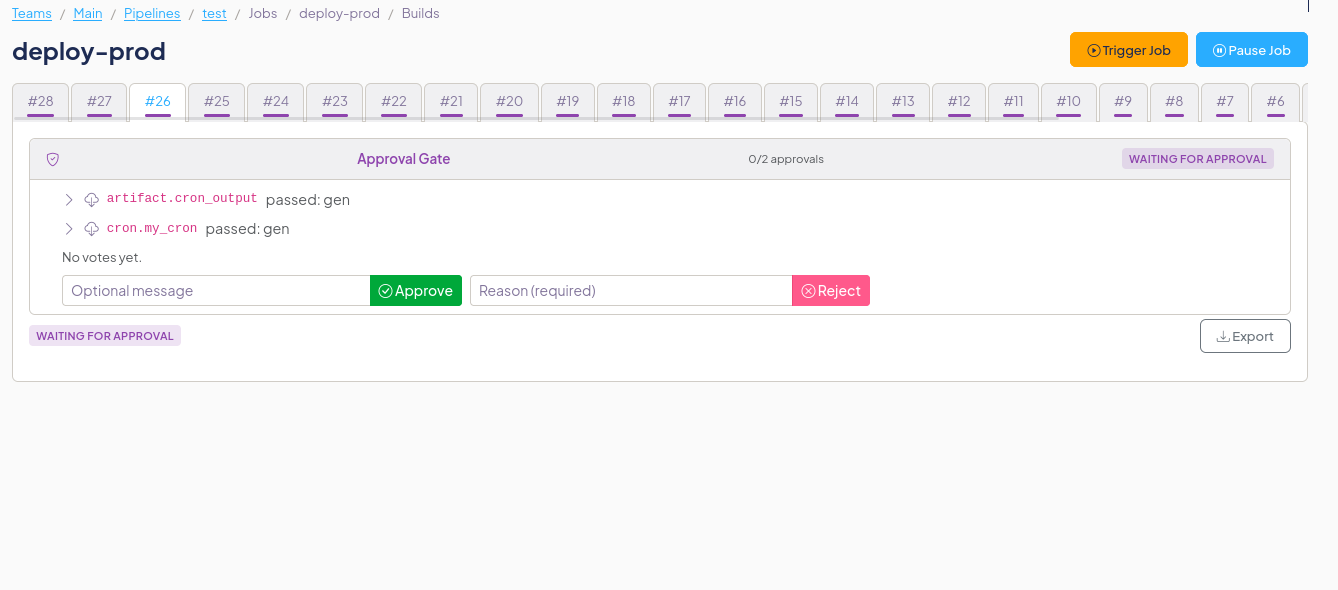
Navigate to the job's builds page. Builds waiting for approval show a purple Waiting for Approval card with:
- Vote history: who approved/rejected and when
- Approve button: with optional message (Maintain+ only)
- Reject button: with required reason (Maintain+ only)
Read and Write users can see the approval panel and vote history but cannot vote.
Via the CLI
# Approve a build
pikoci client builds approve \
  --team-canonical main \
  --pipeline-name deploy \
  --job-name deploy \
  --build-number 5 \
  --message "LGTM"

# Reject a build
pikoci client builds reject \
  --team-canonical main \
  --pipeline-name deploy \
  --job-name deploy \
  --build-number 5 \
  --message "not ready — missing migration"
Via the API
# Approve
curl -X POST \
  -H "Authorization: Bearer $TOKEN" \
  -H "Content-Type: application/json" \
  -d '{"message": "LGTM"}' \
  https://ci.example.com/teams/main/pipelines/deploy/jobs/deploy/builds/5/approve

# Reject
curl -X POST \
  -H "Authorization: Bearer $TOKEN" \
  -H "Content-Type: application/json" \
  -d '{"message": "not ready"}' \
  https://ci.example.com/teams/main/pipelines/deploy/jobs/deploy/builds/5/reject
Permissions
| Action | Required Role |
|---|---|
| View approval panel and votes | Read+ |
| Approve a build | Maintain+ |
| Reject a build | Maintain+ |
| Cancel a waiting build | Write+ |
Audit Log
Approval actions are recorded in the team audit log:
| Action | When |
|---|---|
build.approved |
A user approves a build |
build.rejected |
A user rejects a build |
Edge Cases
- Same user can't vote twice: the database enforces one vote per user per build
- Rejection overrides approvals: even if 1 of 2 required approvals is recorded, a single rejection immediately fails the build
- No cascade: approving build #5 does not affect build #3 (each build needs individual approval)
- Retries skip the gate: retrying a failed build creates a new build that goes directly to Pending
- No approve block = normal flow: jobs without an
approveblock behave exactly as before
Planned Features
The following features are planned but not yet implemented:
- Approval timeout: automatic failure of builds that wait too long for approval (#584).